
A dependable IPTV reseller support workflow is what separates resellers who keep customers past their first renewal from those who lose them within weeks. It’s not about hiring more people or buying another tool. It’s about having a clear sequence for what happens the moment a customer reports a problem, right through to confirming it’s actually fixed.
Why Most Reseller Support Breaks Down Before It’s Ever Tested
Most UK IPTV Panel resellers don’t design a support process. They start selling, a customer messages them about a frozen channel, they fix it manually, and that becomes “the process” by accident. It works fine at ten customers. At a hundred, the same approach means messages get missed, the same question gets answered five different ways, and nobody remembers which customer already had their credit issue looked at last week.
The problem isn’t volume on its own. It’s that an accidental workflow has no structure to absorb volume. Every message becomes a one-off decision instead of following a known path.
The Core Stages of an IPTV Reseller Support Workflow
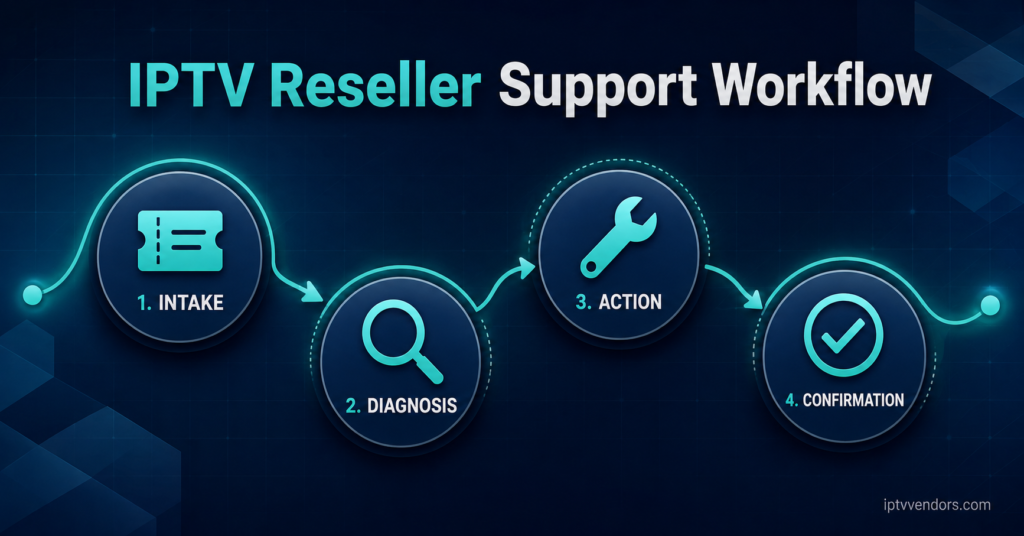
A working structure usually breaks into four stages, and skipping any one of them is where things go wrong.
Intake. The customer reports something, and it needs to land somewhere trackable rather than buried in a chat thread that scrolls past in an hour.
Diagnosis. Before touching anything, you need to know whether the issue sits with the customer’s device, their connection, or the panel itself. Guessing here wastes time on both sides.
Action. This is the actual fix: reissuing a line, adjusting an expiry date, pointing the customer to a different server region, or escalating upward if it’s outside your control.
Confirmation. The customer confirms the problem is actually resolved. Skipping this step is how the same complaint reappears three days later, except now it looks like you ignored it.
Pro tip: Keep a simple log of every ticket’s stage, even if it’s just a spreadsheet. Knowing that six tickets are stuck at “diagnosis” tells you something is wrong with that step specifically.
Where Diagnosis Usually Gets Skipped
Diagnosis is the stage IPTV Panel resellers cut corners on most, mainly because it feels slower than just applying the obvious fix. But an obvious fix applied to the wrong cause creates a second support message instead of closing the first one.
A few questions sort most cases quickly:
Is the issue affecting one customer or several at once? One customer usually points to their device, app, or local connection. Several customers reporting the same symptom around the same time usually points to the server or the panel provider.
Did anything change recently on the customer’s side? A new router, a firmware update, or a different app version accounts for a large share of “it stopped working” messages that have nothing to do with the subscription itself.
Structuring Escalation So It Doesn’t Sit With You Alone
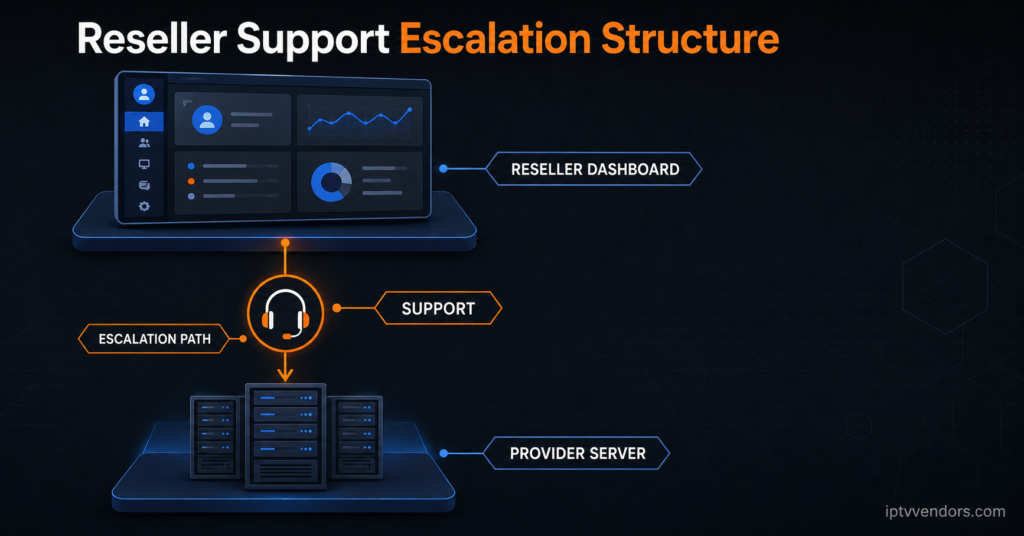
At small scale, every issue lands on one person, usually the reseller themselves. That works until it doesn’t. Escalation needs a defined boundary: which problems you resolve directly, and which ones get passed to your provider because they sit outside the reseller dashboard’s control.
Server outages, panel-wide authentication failures, and infrastructure issues belong with the provider. Customer-side device setup, credit allocation, and account management belong with you. Mixing these up either means you’re waiting on a provider for something you could have fixed in two minutes, or you’re trying to troubleshoot infrastructure you have no visibility into.
Choosing the Right Panel Support to Build On
None of this structure holds up if the panel underneath it doesn’t give you the visibility to diagnose problems yourself. A dashboard that shows connection status, credit balance, and expiry dates in one place lets you answer most customer questions without needing to escalate at all. Our guide on what to look for in a reseller panel covers the dashboard features that actually affect day-to-day support load, rather than the ones that just look good in a sales pitch.
Pro tip: Before committing to a provider, ask what their own support response time looks like during a genuine outage, not during a sales conversation. That answer tells you more than any feature list.
Documentation Is the Part Resellers Skip Until It’s Too Late
A support workflow without documentation only exists in one person’s head. If you’re the only one who knows that a specific error code means the customer needs their MAC address re-registered, the business can’t function without you personally answering every message. Even a short internal document covering the five or six most common issues and their fixes means a second person, or a future version of you at 2am, can resolve things without starting from scratch.
This matters even more if you’re running or supporting a white label IPTV panel, where your customers may not realise there’s a wholesale provider behind the brand at all. Every support interaction reflects directly on your business name, so consistency in how issues get answered isn’t optional.
Setting Expectations Before the First Ticket Ever Arrives
A large share of support friction comes from customers not knowing what to expect in the first place. If someone doesn’t know that occasional buffering during peak evening hours is a known and temporary pattern rather than a fault, they’ll message you every time it happens. A short setup message covering realistic expectations, basic troubleshooting steps, and how to reach you cuts down on repeat messages before they start. This is worth building into your reseller website setup so it reaches customers automatically rather than depending on you remembering to send it.
Pro tip: Send a one-page setup guide with every new activation. Most support messages in the first week are questions this document already answers.
Scaling the Workflow Without Losing Response Time
As your customer base grows, response time is usually the first thing that slips. The fix isn’t necessarily more staff. It’s tightening the intake and diagnosis stages so fewer messages need a fully manual response. Grouping recurring issues, like latency during specific hours, into a documented explanation you can send instantly does more for response time than hiring someone to type the same answer faster. Our IPTV latency optimisation guide is a useful reference to point customers toward directly when the cause is connection-related rather than account-related.
Frequently Asked Questions
How many support stages does a reseller actually need?
Four is usually enough: intake, diagnosis, action, and confirmation. Adding more stages tends to slow things down without improving accuracy.
Should I handle all support myself as a new reseller?
At low volume, yes, this is manageable and helps you learn the common issues firsthand. The point to change is when tickets start sitting unanswered for more than a day.
What’s the fastest way to reduce repeat tickets?
Documenting the five most common issues and sending a setup guide at activation removes a large share of avoidable messages before they’re sent.
How do I know if a problem is mine to fix or the provider’s?
If it affects one customer, it’s almost always device or connection related and sits with you. If several customers report the same symptom simultaneously, it’s usually server-side and belongs with the provider.
Does a support workflow need dedicated software?
Not necessarily. A spreadsheet or a simple shared inbox with tagging is enough at small scale. Dedicated tools only pay off once ticket volume makes manual tracking unreliable.
Reseller Support Workflow Checklist
- Every incoming message gets logged somewhere trackable, not left in a scrolling chat
- Diagnosis happens before a fix is applied, even when the cause seems obvious
- A clear line exists between what you fix and what gets escalated to the provider
- Common issues and their fixes are written down somewhere other than your memory
- New customers receive a setup guide covering realistic expectations
- Every resolved ticket gets a confirmation message before it’s marked closed
Getting the IPTV reseller Panel support workflow right isn’t about eliminating problems. Customers will always hit the odd buffering issue or forget their login details. What changes is how quickly those issues move from reported to resolved, and whether the same problem keeps resurfacing because nothing was documented the first time. Start with the four stages, be honest about where escalation belongs, and build documentation as you go rather than promising yourself you’ll do it later.