
Let’s kill a myth straight away. The number your internet provider advertises on the box has almost nothing to do with whether your IPTV service actually works. You could be sitting on a 200 Mbps fibre line and still get buffering during a Saturday evening football match. Meanwhile, someone on 30 Mbps watches the same stream without a single stutter.
That’s because IPTV internet speed requirements aren’t just about raw bandwidth. They’re about what happens between your router and the server delivering your stream, jitter, packet loss, routing hops, DNS resolution, and whether your ISP is quietly throttling encrypted video traffic at peak hours.
This guide breaks down the real IPTV internet speed requirements that matter in 2026, not the theoretical ones you find copy-pasted across a hundred generic blogs. Whether you’re a household subscriber trying to run three screens at once, or a reseller fielding complaints from customers who swear their internet is “fast enough,” this is the field-tested breakdown you actually need.
We’re covering minimum thresholds, multi-device maths, ISP interference patterns, and infrastructure-side optimizations that IPTV reseller Panel can deploy to reduce speed-related complaints by half.
Minimum Download Speeds That Actually Hold Up
Forget the textbook answer of “10 Mbps for HD.” That figure assumes perfect conditions, zero congestion, no background downloads, a single device connected, and a CDN node within arm’s reach. That’s nobody’s real life.
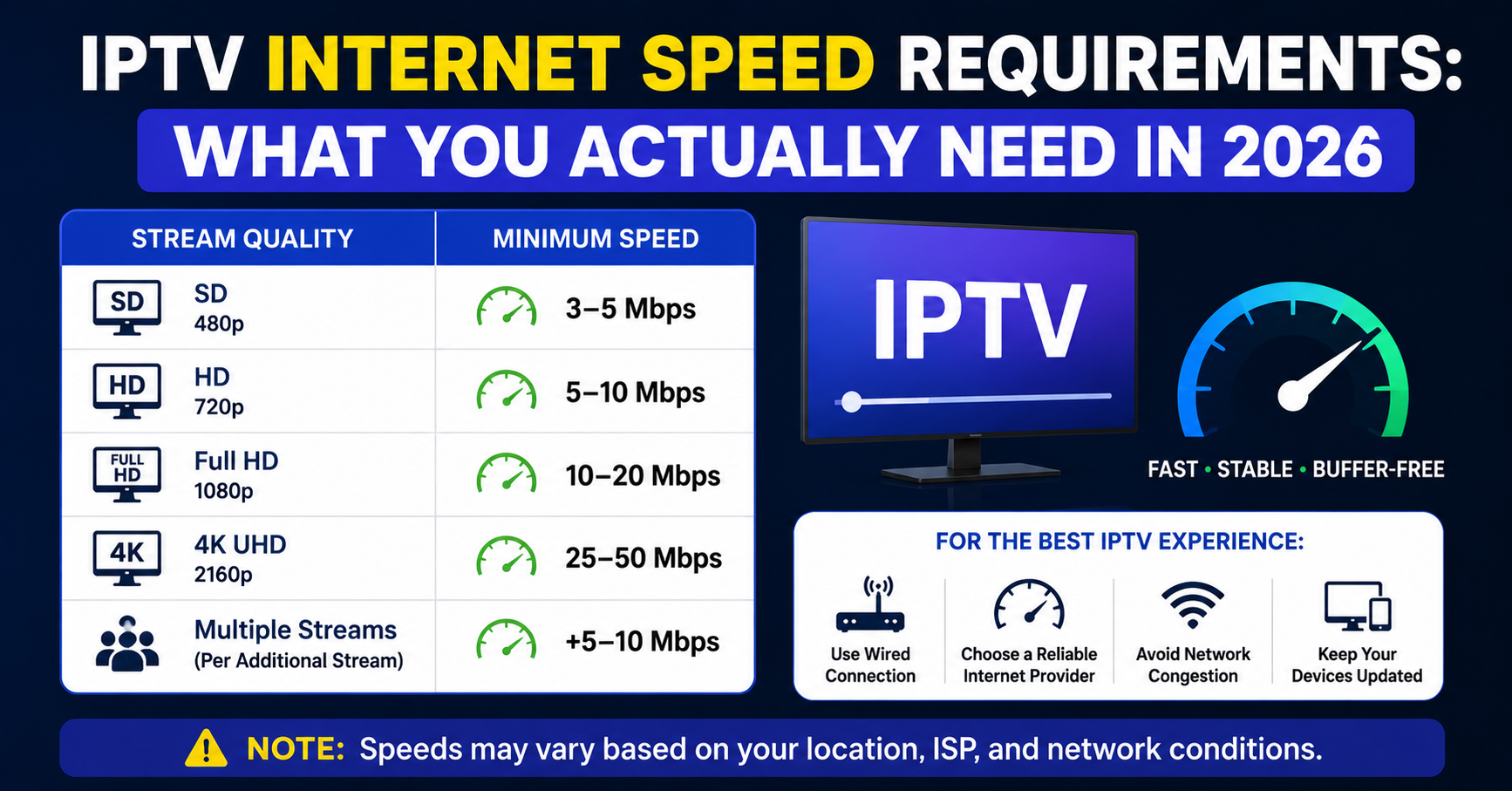
Here’s what genuinely holds in practice for different stream qualities. SD streams (480p) need 3 to 5 Mbps per device and stay stable on most connections, even mobile data. HD streams (720p to 1080p) need 8 to 15 Mbps per device, and the range exists because encoding quality varies wildly between providers. FHD streams (1080p constant) need 15 to 25 Mbps per device, with providers using H.265 encoding sitting at the lower end. 4K streams need 35 to 50 Mbps per device, though realistically most IPTV panels don’t even serve true 4K, it’s often upscaled 1080p.
Pro Tip: When a customer complains about buffering on a “fast connection,” ask them to run a speed test to a server in the same country as your uplink, not to Google’s DNS. That’s the number that matters for IPTV internet speed requirements diagnostics.
Why Upload Speed Gets Ignored (And Shouldn’t)
Everyone obsesses over download speed. Almost nobody checks upload. But here’s the thing, IPTV relies on a constant handshake between the player and the server. Your device sends acknowledgement packets, EPG requests, and authentication pings upstream. If your upload is choked, streams stall even when download bandwidth is plentiful.
Most residential broadband packages offer asymmetric speeds. You might get 80 Mbps down but only 10 Mbps up. On a household running IPTV across three devices alongside a video call and a cloud backup running in the background, that upload pipe fills up fast.
For stable IPTV internet speed requirements, a minimum upload of 5 Mbps is the baseline. If the household uses any kind of surveillance camera system, cloud syncing, or livestreaming on other platforms, that baseline jumps to 10 Mbps.
The table below shows how download and upload needs scale with usage:
| Scenario | Download needed | Upload needed |
|---|---|---|
| Single HD stream, no other activity | 10 Mbps | 2 Mbps |
| 2 HD streams + browsing | 25 Mbps | 5 Mbps |
| 3 FHD streams + gaming | 50 Mbps | 8 Mbps |
| 4K + multi-room + smart home | 75 Mbps+ | 10 Mbps+ |
Resellers, if you’re building a troubleshooting guide for customers, include upload speed in the diagnostic checklist. It solves about 15% of “my internet is fine but it’s still buffering” tickets.
The Multi-Device Multiplier Most People Forget
A single-stream speed test means nothing in a household where six devices are connected. IPTV internet speed requirements scale linearly per active stream, and non-linearly once you factor in background device activity.
Here’s how the maths actually works. Take your per-stream requirement and multiply by the number of simultaneous IPTV streams. Then add 30% overhead for other connected devices, phones syncing, tablets updating apps, smart speakers polling, laptops downloading silently.
A family of four running two HD IPTV streams during peak evening hours, with two phones and a laptop idling on the network, needs roughly 35 to 40 Mbps of usable bandwidth. Not advertised bandwidth. Usable.
Pro Tip: Advise customers to check their router’s connected device list. Most people underestimate by half. That “fast broadband” is being carved up between fifteen devices, not two.
ISP Throttling: The Invisible Wall Against Your Streams
This is the part nobody in generic IPTV guides talks about honestly. ISPs in 2026 are using deep packet inspection, AI-driven traffic classification, and SNI-based filtering to identify and throttle IPTV traffic, even when it’s encrypted.
Meeting the raw IPTV internet speed requirements on paper doesn’t matter if your ISP is actively degrading video traffic. The telltale signs include streams that work perfectly at 2 AM but buffer endlessly at 8 PM, or connections that test fine on speed tests but can’t hold a 720p stream.
The countermeasures that actually work in 2026 include a VPN with the WireGuard protocol, lightweight enough to avoid adding latency, strong enough to mask traffic patterns (OpenVPN adds too much overhead for live streams). DNS-over-HTTPS prevents ISPs from identifying streaming domains via DNS queries, and should be configured at the router level rather than per device. And changing DNS servers away from your ISP’s default to privacy-focused alternatives reduces DNS poisoning risks.
Resellers should proactively educate customers about ISP throttling. The ones who do this see significantly fewer support tickets and lower churn, because the customer stops blaming the IPTV service for what is actually an ISP problem.
Wired vs Wireless: The Speed You Lose Before It Reaches Your Box
You can have a 300 Mbps connection and still fail basic IPTV internet speed requirements at the device level, because WiFi is eating your speed alive.
A device connected over WiFi in another room from the router, through two walls and a floor, might only see 20 to 40% of the advertised speed. That 300 Mbps line becomes 60 to 120 Mbps at the device. Factor in interference from neighbouring networks, microwave ovens, and Bluetooth devices, and it drops further.
For IPTV specifically, Ethernet is king. A wired connection to your IPTV box eliminates WiFi variability entirely, and even a cheap Cat5e cable across the room transforms reliability. WiFi 6 (802.11ax) helps with multi-device congestion but doesn’t solve wall penetration. Powerline adapters are a middle ground, using your home’s electrical wiring, hit or miss depending on the age of your wiring but better than WiFi through three walls. Mesh WiFi systems spread coverage but add latency at each hop, fine for browsing, problematic for live streams.
Pro Tip: If a customer insists on WiFi, tell them to switch their router to the 5 GHz band for the IPTV device and keep everything else on 2.4 GHz. The 5 GHz band offers higher throughput with less interference, provided the device is within reasonable range.
Jitter and Packet Loss: The Metrics Nobody Checks
Speed isn’t the whole story. Two connections with identical download speeds can deliver completely different IPTV experiences because of jitter and packet loss. These are the silent killers of live streaming, and they don’t show up on a basic speed test.
Jitter is the variation in packet arrival times. IPTV streams rely on packets arriving in a consistent rhythm. High jitter means the buffer can’t stay ahead of playback, causing freezes even on fast connections. For stable IPTV internet speed requirements, jitter should stay below 30ms, with below 10ms being ideal.
Packet loss above 1% makes live IPTV unwatchable. The stream might look fine for ten seconds, then pixelate violently, then recover, on a loop. HLS-based streams handle packet loss slightly better than raw UDP streams because of segment-based delivery, but neither tolerates it well.
Here’s how the key metrics break down:
| Metric | Acceptable | Ideal | Problematic |
|---|---|---|---|
| Jitter | Under 30ms | Under 10ms | Above 50ms |
| Packet loss | Under 1% | Under 0.1% | Above 2% |
| Latency (ping) | Under 100ms | Under 40ms | Above 150ms |
Run a proper network quality test, not just a download speed check, and these numbers tell you more about stream stability than raw Mbps ever will.
What Resellers Can Do on the Infrastructure Side
Here’s where IPTV internet speed requirements become a two-way street. It’s not just the customer’s connection that matters, the server infrastructure you’re reselling from plays an equal role.
A cheap panel running on a single server in one location will struggle to deliver smooth streams regardless of the customer’s broadband. Load balancing across multiple uplink servers, geographic distribution of CDN nodes, and proper HLS segmentation all reduce the speed burden on the end user.
Back-up uplink servers aren’t optional. When the primary goes down during a major sporting event, customers don’t wait, they leave. Redundancy isn’t a luxury, it’s retention. Load balancing distributes connections so no single server gets overwhelmed during peak, and the cheapest panels skip this entirely, their UK IPTV resellers pay for it in refund requests. H.265 encoding cuts bandwidth requirements by roughly 40% compared to H.264 at equivalent quality, so if your panel provider still relies on H.264, your customers need significantly faster connections for the same picture. Adaptive bitrate streaming adjusts stream quality dynamically based on the viewer’s available bandwidth, and panels that support this generate far fewer buffering complaints.
Pro Tip: Before committing to any panel provider, test their streams during peak hours from three different ISPs. The IPTV internet speed requirements your customers will actually face depend on how well that provider handles load, not what they promise on a sales page.
How to Test Your Connection Properly for IPTV
Most people test their speed wrong. They open a generic speed test site, see a big number, and assume everything is fine. But generic speed tests route to the nearest server, which might be a data centre five miles away. Your IPTV stream is coming from a server in Amsterdam, Frankfurt, or wherever the panel host sits.
A proper test looks like this. Test to a server in the same country or region as your IPTV provider’s uplink, since many speed test tools let you choose the server location manually. Test at peak hours, between 7 PM and 10 PM on weekdays, and during major broadcast events, because off-peak results are meaningless for diagnosing evening buffering. Test on the exact device and connection type (wired or wireless) that you use for IPTV, since testing on a laptop over Ethernet when you watch on a Firestick over WiFi gives misleading results. And run the test three times and average the results, because single tests are unreliable due to momentary fluctuations.
If your tested speed to the relevant server region exceeds your per-stream requirement by at least 50%, you’re in a healthy range. If it barely meets it, expect intermittent issues during congestion.
When Fibre Isn’t Actually Fibre
This catches people out constantly. “Fibre broadband” in most markets doesn’t mean fibre to your home. It usually means fibre to the cabinet (FTTC), and the last stretch to your property runs over old copper telephone wire. That last stretch is where speed degrades.
True fibre-to-the-premises (FTTP) delivers consistent speeds because the entire path is optical. FTTC connections lose speed proportionally with distance from the cabinet. If you’re 300 metres from the cabinet, your actual speed might be half the advertised figure.
For IPTV internet speed requirements, the type of connection matters more than the headline speed. A 40 Mbps FTTP line will outperform a 70 Mbps FTTC line for streaming stability in most cases, because the FTTP connection delivers consistent throughput without the variability copper introduces.
Resellers dealing with customer complaints should ask one question before anything else: “Is your connection FTTP or FTTC?” It immediately narrows the diagnostic path.
Satellite and Mobile Data: The Edge Cases
Not every customer sits on a stable broadband line. Some are using 4G/5G mobile broadband, satellite internet, or rural wireless connections. The IPTV internet speed requirements for these connection types deserve separate consideration because they behave fundamentally differently.
4G/LTE can handle SD and HD streams during off-peak, but struggles badly during network congestion. Latency is typically 30 to 70ms, which is acceptable, but packet loss spikes unpredictably, so it’s not recommended for multi-device IPTV setups.
5G is genuinely viable for IPTV in 2026 where coverage is strong, offering low latency, high bandwidth, and reduced congestion compared to 4G. The catch is coverage consistency, since 5G signals drop off sharply indoors and behind walls.
Satellite (LEO constellations) has seen latency drop dramatically compared to traditional geostationary satellite. It’s usable for IPTV, but weather-dependent, and rain fade can interrupt streams without warning.
Pro Tip: If a significant portion of your reseller customer base uses mobile data, offer them lower-resolution stream options. A 480p stream over a stable 4G connection beats a 1080p stream that buffers every forty seconds.
Router Settings That Quietly Destroy Stream Quality
Sometimes the IPTV internet speed requirements are met, the connection is solid, the panel infrastructure is fine, and the stream still buffers. Nine times out of ten, it’s the router.
Consumer-grade routers ship with default settings that actively work against IPTV streaming. A few quick changes on the router admin panel can eliminate persistent issues.
QoS (Quality of Service) is worth setting first. Most modern routers support traffic prioritization, so set the IPTV device’s MAC address as high priority, and the router will allocate bandwidth to it first before serving other devices.
SPI Firewall settings matter too. Some routers have overly aggressive stateful packet inspection that interferes with streaming protocols. If streams stall consistently but browsing works fine, try disabling SPI temporarily to diagnose.
MTU settings are worth checking. The default MTU of 1500 bytes works for most scenarios, but some ISPs use PPPoE connections that require a lower MTU of 1492. A mismatch causes fragmented packets and micro-stutters.
Firmware updates round this out. Outdated router firmware can contain bugs that affect NAT handling and UDP forwarding, both critical for IPTV. Check for updates quarterly.
Frequently Asked Questions
What are the minimum IPTV internet speed requirements for a single HD stream?
For a single HD stream at 720p to 1080p, you need a stable 8–15 Mbps download speed. The range depends on the encoding standard your provider uses. H.265 encoded streams sit at the lower end, while older H.264 streams demand closer to 15 Mbps. Always test to a server in your provider’s region, not to a local speed test node, for an accurate reading.
Can I watch IPTV on a 10 Mbps connection?
Yes, but only comfortably on a single SD or low-HD stream with minimal background network activity. If anyone else in the household is browsing, downloading, or streaming on another device, 10 Mbps will not sustain a smooth IPTV experience. For households, 25 Mbps is a far safer minimum to account for shared usage and overhead.
Why does my IPTV buffer even though my speed test shows fast internet?
Speed tests measure throughput to a nearby server under ideal conditions. Your IPTV stream originates from a remote server, passes through multiple routing hops, and competes with ISP throttling and network congestion. Jitter, packet loss, and DNS poisoning are common culprits that a basic speed test won’t reveal. Test to a server near your IPTV provider’s infrastructure for meaningful results.
Do IPTV internet speed requirements change for 4K streams?
Absolutely. True 4K IPTV demands 35–50 Mbps per stream. However, many IPTV providers advertise 4K when the actual source is upscaled 1080p, which only needs 15–25 Mbps. Ask your provider whether their 4K content is native or upscaled before upgrading your internet package specifically for it.
Does using a VPN affect IPTV speed requirements?
A VPN adds encryption overhead that reduces usable speed by roughly 10–20%, depending on the protocol. WireGuard adds the least overhead and is recommended for IPTV. If your base connection is 50 Mbps, expect around 40–45 Mbps through a WireGuard VPN. Factor this reduction into your IPTV internet speed requirements calculation.
How can IPTV resellers reduce speed-related customer complaints?
Resellers should deploy panels that support adaptive bitrate streaming and H.265 encoding, which lower the bandwidth threshold for smooth playback. Providing customers with a proper connection testing guide, including peak-hour testing and jitter checks, preempts most complaints. Maintaining back-up uplink servers and load balancing across multiple nodes ensures the infrastructure side doesn’t amplify customer-side speed limitations.
Is fibre broadband always fast enough for IPTV?
Not necessarily. Fibre-to-the-cabinet connections degrade over the copper last mile, and actual speeds can be significantly lower than advertised. FTTP connections are far more reliable for IPTV because throughput remains consistent. A 40 Mbps FTTP line is often more stable for streaming than a 70 Mbps FTTC line.
What router settings should I change to improve IPTV streaming?
Enable QoS and prioritize your IPTV device by MAC address. Switch the IPTV device to the 5 GHz WiFi band if a wired connection isn’t feasible. Check that your MTU matches your ISP’s requirements, 1492 for PPPoE connections. Update your router firmware regularly, as outdated firmware can introduce bugs affecting UDP forwarding and NAT handling.
IPTV Internet Speed Requirements: Your Reseller Success Checklist
- Benchmark your panel’s actual stream bitrates across SD, HD, and FHD at peak hours. Document the real Mbps per stream, not the provider’s marketing claims, and use these figures in your customer onboarding materials.
- Build a one-page connection guide for customers that includes minimum download and upload thresholds, instructions for testing to the correct server region, and a jitter/packet loss check. Distribute it before the first support ticket arrives.
- Confirm your panel provider uses H.265 encoding and adaptive bitrate. If they don’t, you’re forcing every customer to over-provision their internet. That’s churn waiting to happen.
- Audit your uplink redundancy. Ensure your provider runs back-up uplink servers in at least two geographic locations. Test failover by simulating primary downtime during a non-peak window.
- Create a router configuration cheat sheet covering QoS setup, 5 GHz band assignment, MTU adjustment, and firmware update reminders. Customers who configure their routers properly generate 40–50% fewer support requests.
- Add VPN guidance to your FAQ or knowledge base. Recommend WireGuard specifically, and include the expected speed overhead so customers can factor it into their IPTV internet speed requirements.
- Segment your customer base by connection type. FTTP users need different guidance than FTTC, mobile broadband, or satellite users. Tailor your support scripts accordingly.
- Visit britishseller.co.uk for UK IPTV panel options that include built-in load balancing, multi-server redundancy, and adaptive bitrate, infrastructure features that directly reduce the speed burden on your end users.